I’m proud to announce my first open-source Python package: streamlit-arborist, a Streamlit component for visualizing hierarchical data structures as interactive tree views.
- Repository: github.com/gabriel-msilva/streamlit-arborist
- Demo app: st-arborist-example.streamlit.app
- Documentation: streamlit-arborist.readthedocs.io
pip install streamlit-arborist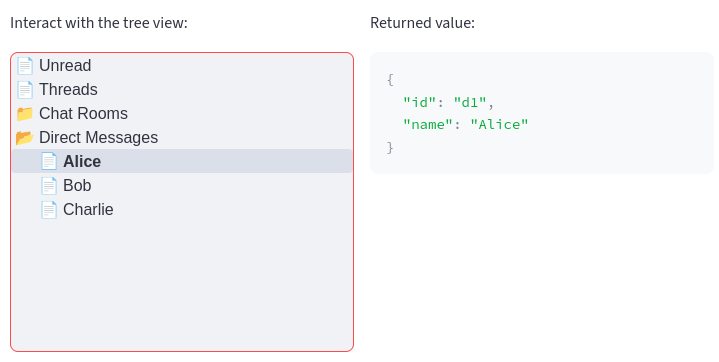
tree_view() component in StreamlitMotivation
I worked in a quite large Streamlit application with hundreds of users. It had a file explorer-like interface for navigating pages, so a tree view was a natural widget.
Streamlit ships a rich set of built-in widgets, but tree navigation is not among them. The closest custom component that existed was streamlit-tree-select but it was not a good fit for our use case.
While we were able to build a custom tree out of HTML + CSS + hacky interaction with the internal Streamlit API, it generated a lot of extra code and we were at risk of being locked to a specific Streamlit version.
It bothered me that such tree data structures were not well-represented in the Streamlit ecosystem. So I decided to build a custom component that could be reused in other projects. I knew I didn’t need to reinvent the wheel: React has very mature components for this, and Streamlit allows wrapping them as first-class widgets.
I found react-arborist, a React component for tree views that is well-maintained and seemed a good choice due to its
- Flexible API, which will offer several options for customization and interaction.
- Good performance for large trees, which is important in data-heavy applications.
Basic usage
See the Usage section in the documentation for more examples.
The data should be a list of dictionaries, where each dictionary represents a node in the tree. Each node should have the following keys:
id(required)name: string to display (optional)children: list of nested nodes (optional)
For example,
from streamlit_arborist import tree_view

data = [
    {"id": "1", "name": "Node 1"},
    {
        "id": "2",
        "name": "Node 2",
        "children": [
            {"id": "2.1", "name": "Node 2.1"},
            {"id": "2.2", "name": "Node 2.2"}
        ]
    }
]

selected = tree_view(data)
tree_view returns the full dictionary of the selected node, so any extra keys you include are available downstream.
The component comes with a range of options, such as customization of sizing and icons (supports Material Symbols) and programmatic selection and filtering. See the Reference API for more details.
What’s next
This is the initial release with the tree_view component for single-node selection. Future releases may add more interaction modes and customization options.
Feedback and contributions are welcome on GitHub!